Spin the Wheel on Twitch: OBS Setup and 12 Wheel Ideas for Your Stream
Why not just screen-capture a wheel?
The first thing most streamers try is a window capture of a wheel website. It works, sort of. You get a white rectangle over your game, menus and cookie banners on stream, and text sized for a laptop, not for a viewer watching on a phone. The stream wheel overlay fixes those three things: a transparent background, nothing on screen but the wheel, and a big result your chat can read.
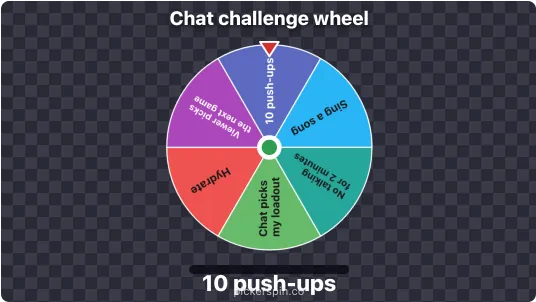
Setting it up in OBS
- On the overlay page, type your options, one per line, up to 60. Add a title if you want one above the wheel.
- Pick a spin length: 4, 6, 10 or 15 seconds. Six is the default and suits most streams. Use ten or fifteen if you want chat to build suspense.
- Press Copy URL.
- In OBS, click + under Sources, choose Browser, paste the URL and set the width to 900 and the height to 1000. Then drag it to the size you want on your canvas.
- To spin, right-click the source and choose Interact. Click the wheel, or press Space or Enter.
Streamlabs Desktop works the same way with a Browser Source. To put the tick sound on your OBS mixer, open the source's properties and tick Control audio via OBS. If you'd rather click a visible button than use Interact, tick Show a Spin button before copying the URL.
Everything about the wheel lives in that URL, so there's no account to make. To change the options, edit them on the page, copy the new URL and paste it over the old one in the source properties.
12 wheels worth making
Challenge wheels
- Handicap wheel: no healing items, crouch-only for a round, pistol only, inverted controls.
- Punishment wheel for deaths or lost rounds. Keep it light, such as push-ups, a bad accent for a minute, or hydrating.
- Loadout or character wheel: one slice per character, weapon or deck. Good for games where you'd otherwise always pick the same one.
- Speedrun rule wheel: a random restriction each attempt.
Let chat decide
- Next game wheel for variety streams. Put the backlog on it and let the wheel end the debate.
- Viewer-choice wheel: chat suggests options, you add the best eight, then spin.
- Stream goal reward wheel: what happens when the sub goal hits.
- Just Chatting topic wheel: story time, hot takes, rate my setup, Q&A.
Giveaways and community
- Giveaway wheel: one name per entrant, with Take each winner off the wheel ticked.
- Who joins the next game: viewer usernames for community nights.
- Raid target wheel: a few friendly channels to pick from at the end of the stream.
- Emote or sound wheel: a silly one for end-of-stream energy.
For party-style prompts you can copy straight in, the dare wheel and would you rather wheel have ready-made lists.
Is it fair? What to tell chat
Someone in chat will ask whether the wheel is rigged. The winner is drawn with your browser's cryptographic random generator before the wheel starts moving. The spin only reveals a result that's already fixed, so neither the animation nor where you click can steer it. Every slice has the same chance. The randomness page lets anyone run thousands of test spins and check the spread themselves, which is a decent link to drop in chat.
Two things to know before a giveaway
- Winners are removed at the start of the next spin, and only while more than two names are left. The winner stays visible until you spin again, so chat can see where it landed. But the last two names are never taken off. If you're drawing more winners than you have entrants minus one, the final spin can repeat a winner. For big giveaways, draw from a list with the bulk name picker or the raffle picker instead.
- Refreshing the source puts everyone back. OBS refreshes browser sources when you change scenes if "Refresh browser when scene becomes active" is ticked. If you're running a giveaway across several scenes, untick that, or note the winners as you go.
Check Twitch's own rules for giveaways in your region too. They apply whatever tool draws the winner.
What it won't do
- No chat commands or channel-point triggers. You spin it yourself. Chat can't start a spin.
- No weighted slices. Every option has the same chance. If you want a rare result, add more of the common ones.
- Up to 60 options. For hundreds of entrants, use a list draw instead of a wheel.
- Commas become spaces. Options are separated by commas in the URL, so "Yes, please" shows as "Yes please".
Drawing a winner from YouTube or Instagram comments rather than chat? The giveaway winner guide walks through it. Want a wheel on a website instead of a stream? The embed code is one iframe.
Frequently Asked Questions
How do I add a spinning wheel to OBS?
Build the wheel on PickerSpin's Twitch overlay page and copy the URL. In OBS, add a Browser source, paste the URL, and set it to 900 by 1000. Right-click the source and choose Interact to spin it by clicking or pressing Space.
Is the wheel background transparent?
Yes. The overlay has no background, so only the wheel and the result text appear over your game.
Does it work with Streamlabs?
Yes. Add a Browser Source in Streamlabs Desktop, paste the same URL and set the size.
Can chat trigger the spin?
No. There are no chat commands or channel-point triggers. The streamer spins it from the Interact window or an optional Spin button.
Can I remove winners for a giveaway?
Yes. Tick Take each winner off the wheel. Each winner is removed when you start the next spin, but the last two names always stay on, so for large giveaways a list draw is safer.
Is the stream wheel random?
Yes. The winner is drawn with the browser's cryptographic random generator before the wheel moves, so every option has the same chance and the animation cannot change the result.